# 合约开源教程

通过BananaTool, 在`BSC`、`ETH`等基础设施完善的链上发行代币时, 合约会自动开源, 无需进行手动操作.

但是在Core等区块浏览器功能不完善的链上,或者因为一些无法预料的情况 无导致法自动开源时, 就需要用户在创建代币完成后, 进行手动开源

下面以BSC测试链为例, 详细描述开源流程

## 1、复制开源参数

在创建代币的确认页面, 将会显示 “开源参数” 选项卡, 点击后可展开信息, 标注了开源时需要用到的各种参数：

<figure><img src="https://1002373828-files.gitbook.io/~/files/v0/b/gitbook-x-prod.appspot.com/o/spaces%2Fz5qZc0sQIttLF0bAx25n%2Fuploads%2FOO78L6GhqOmt7QuVA2le%2Fimage.png?alt=media&#x26;token=7675d037-31d7-40dd-b545-9a49d03b6cc8" alt=""><figcaption></figcaption></figure>

需要记住开源参数，并将`源代码`和`构造参数`复制到本地

## 2、区块浏览器验证 <a href="#id-2-qu-kuai-liu-lan-qi-yan-zheng" id="id-2-qu-kuai-liu-lan-qi-yan-zheng"></a>

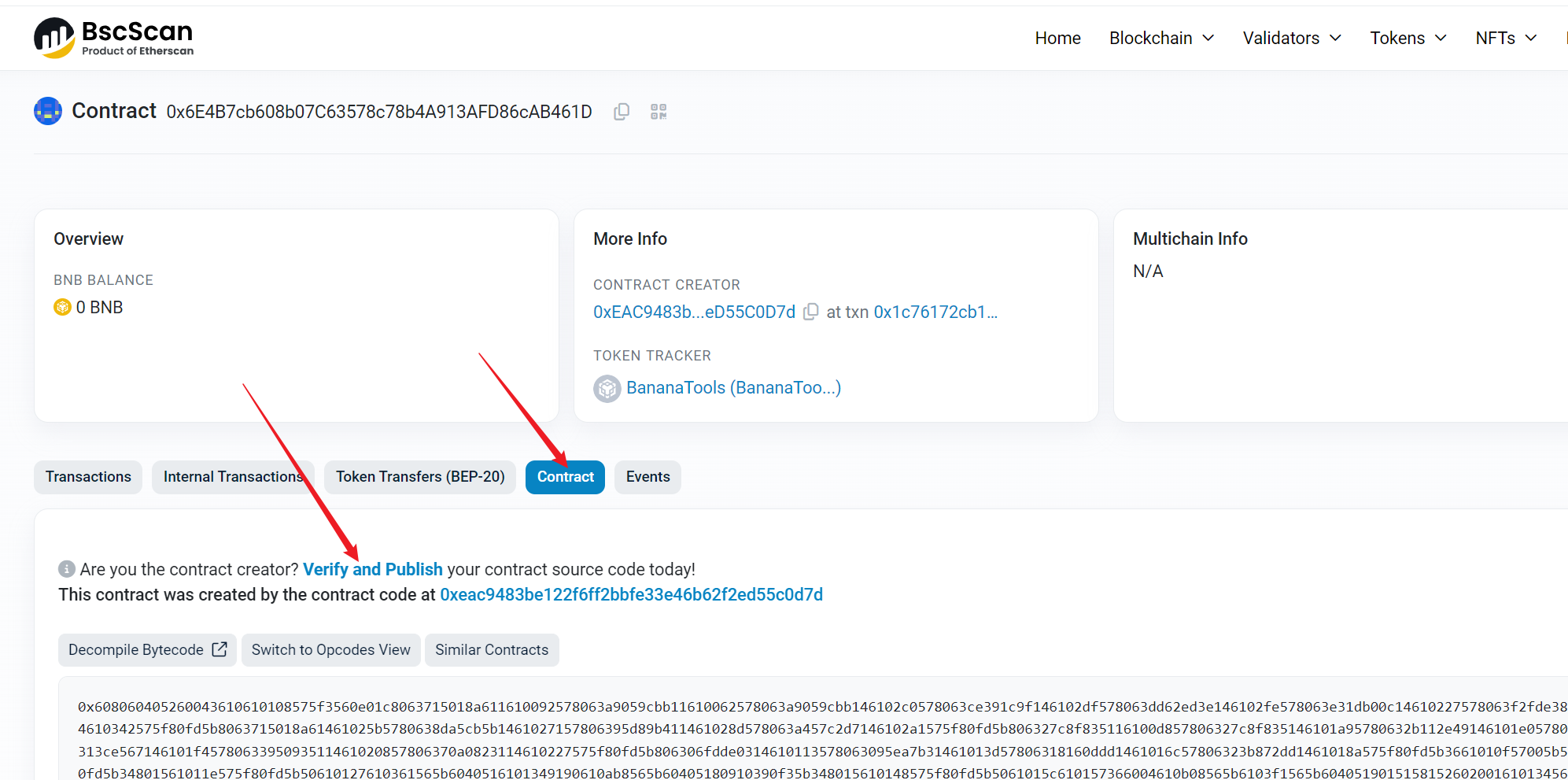
代币创建完成后, 进入区块链浏览器中, 在搜索框中搜索生成的代币合约

<figure><img src="https://1002373828-files.gitbook.io/~/files/v0/b/gitbook-x-prod.appspot.com/o/spaces%2Fz5qZc0sQIttLF0bAx25n%2Fuploads%2FvWbBIlbxBRUGCwfnDpCZ%2Fimage.png?alt=media&#x26;token=72f3b282-8fe4-416f-a007-e33ba3a8366b" alt=""><figcaption></figcaption></figure>

找到合约后，点击“Verify and Publish”（验证与发布合约），之后进入下一步

## 3、选择开源信息 <a href="#id-3-xuan-ze-kai-yuan-xin-xi" id="id-3-xuan-ze-kai-yuan-xin-xi"></a>

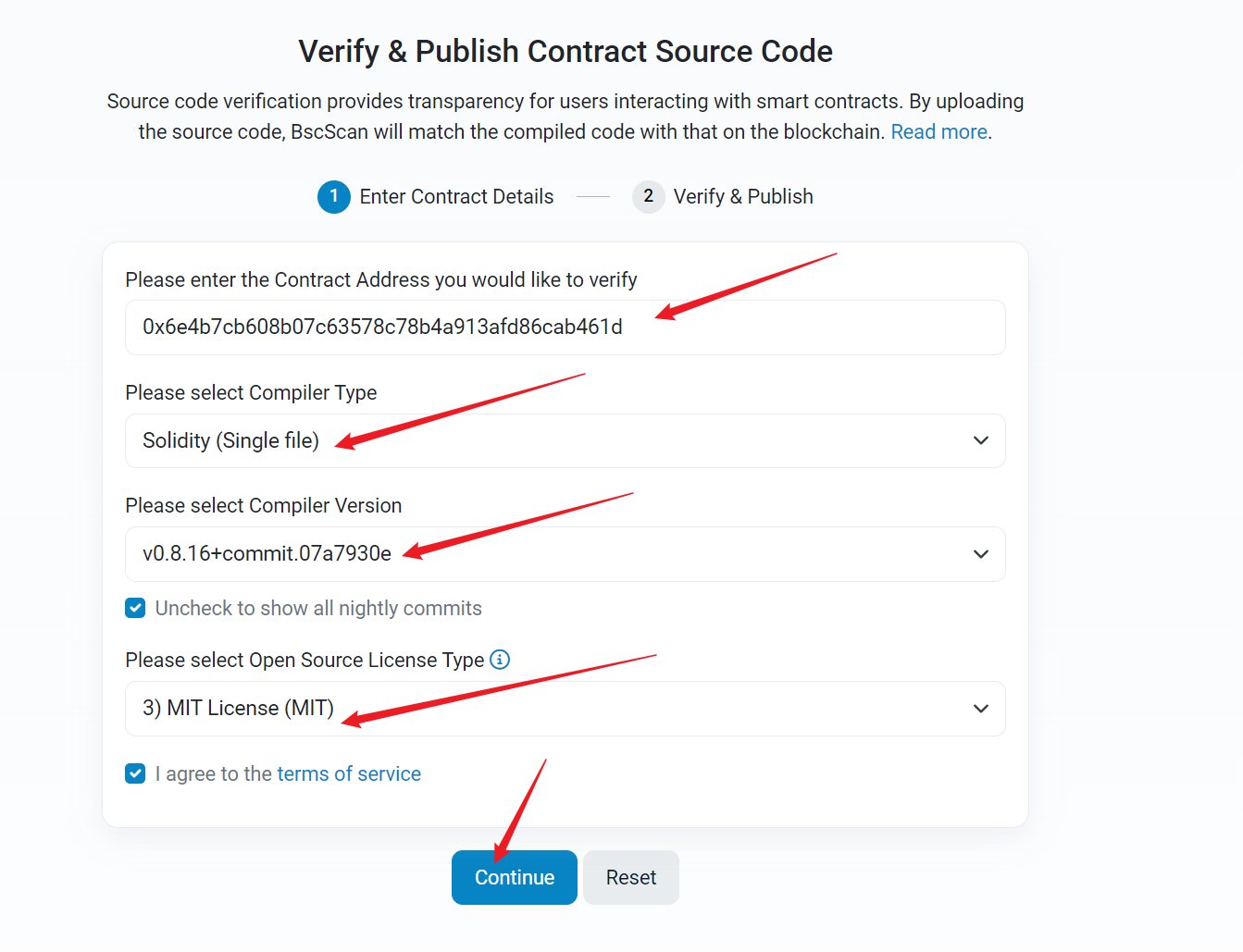
根据刚刚创建页面中的合约参数, 选择开源信息

`Compiler Type` 选择单一文件 `Single file`

编译器版本选择 `0.8.16`

开源协议选择 `MIT`
<figure><img src="https://1002373828-files.gitbook.io/~/files/v0/b/gitbook-x-prod.appspot.com/o/spaces%2Fz5qZc0sQIttLF0bAx25n%2Fuploads%2Fj50mbGHDev5ZGyeAS2c7%2Fimage.png?alt=media&#x26;token=f5ed4a6b-54db-4409-918c-8382fb2b4171" alt=""><figcaption></figcaption></figure>

## 4、填写开源资料 <a href="#id-4-tian-xie-kai-yuan-zi-liao" id="id-4-tian-xie-kai-yuan-zi-liao"></a>

点击 `continue` 继续填写详细信息

* `Optimization` 选择 yes
* 将第1步中复制的 `源代码` 粘贴在 `Contract Solidity Source Below` 中
* 将第1步中复制的 `构造参数` 粘贴在 `Constructor Arguments` 中

<figure><img src="https://1002373828-files.gitbook.io/~/files/v0/b/gitbook-x-prod.appspot.com/o/spaces%2Fz5qZc0sQIttLF0bAx25n%2Fuploads%2FgQtc226BaZcQJvY3r9Bz%2Fimage.png?alt=media&#x26;token=69848fa3-9461-457f-99d8-be1a37f51a9c" alt=""><figcaption></figcaption></figure>

## 5、完成开源

进行谷歌人机验证，通过后点击“Verify and Publish”，等待十几秒钟，即可完成开源

<figure><img src="https://1002373828-files.gitbook.io/~/files/v0/b/gitbook-x-prod.appspot.com/o/spaces%2Fz5qZc0sQIttLF0bAx25n%2Fuploads%2FdFAGzBUhXtlo7KDWjagk%2Fimage.png?alt=media&#x26;token=165e5922-a10c-481a-9093-655e18b9a644" alt=""><figcaption></figcaption></figure>

这样显示表示代币已经开源成功了

<figure><img src="https://1002373828-files.gitbook.io/~/files/v0/b/gitbook-x-prod.appspot.com/o/spaces%2Fz5qZc0sQIttLF0bAx25n%2Fuploads%2F2mh5K2mpMtTUARh4Z8co%2Fimage.png?alt=media&#x26;token=6efd1a5b-0a21-42eb-bb55-6a8ead99653d" alt=""><figcaption></figcaption></figure>